Constant-Velocity : Two Positions

<< Click to Display Table of Contents >>

Navigation:  MotionDesigner Reference & User Interface > Motion Laws / Cam-Laws for Segments >

Constant-Velocity : Two Positions

Constant-Velocity | Two Position

See also : Constant-Velocity.


Motion-Description

Constant-Velocity Two Position is not in the list of motion-laws in the Motion-Law Selector.

You must use the Flexible-Polynomial and carefully select the Control-Buttons to define a segment between two positions.

We calculate for you the Velocity motion-value for you from the Segment-Width and the difference between the Start-Position and End-Position of this segment.

We also calculate the Acceleration and Jerk motion-values, which are zero.


Note: Motion-Continuity

See here to make sure there is motion-continuity from the Previous Segment and to Next-Segment.

Motion-Values

You CAN control the:

Start-Position

The Start-Position usually flows from the End-Position of the Previous-Segment.

End-Position

You CANNOT control the:

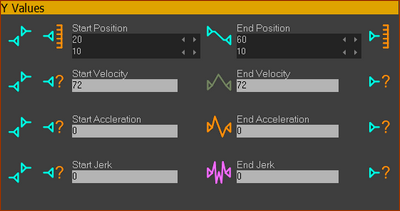
Start-Velocity is equal to the End-Velocity - we calculate the Velocity from the Segment-Width and the difference between the End-Position and Start-Position.

Start Acceleration and End-Acceleration - they are = 0

Start-Jerk and End-Jerk - they are = 0

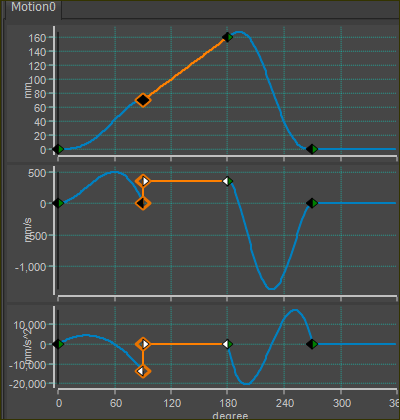
Example of Constant-Velocity Two Position segment

2 Position, Constant-Velocity BUT Step Change in Velocity

2 Position, Constant-Velocity
BUT Step Change in Velocity


Control-Buttons of the Constant-Velocity Two Position segment (Segment-Editor)

This is a special motion-law, in which YOU must configure carefully the Control-Buttons and motion-values of the Constant-Velocity Two Position segment.

SEGMENT EDITOR: Control-Buttons for a 'Two Position | Constant-Velocity motion-law.

SEGMENT EDITOR: Control-Buttons for a 'Two Position | Constant-Velocity motion-law.

To configure the Control-Buttons for the Constant-Velocity : Two-Position motion-law:

1.Select the segment you want to be Constant-Velocity : Two-Position segment

2.Use the Motion-Law Selector to select Flexible-Polynomial

3.Open the Segment Editor

4.Make sure that the Match-Position Control-Button is active.

5.Deselect Match-Velocity, Match-Acceleration, and Match-Jerk (Flow) Control-Buttons

6.Deselect Start Velocity, Start Acceleration, and Start Jerk Control-Buttons

7.Deselect End-Velocity, End-Acceleration, and End-Jerk Control-Buttons

8.Edit the Start-position and End-Position values

9.Edit the Segment-Width in the X-axis values separator.

Control-Buttons of the Previous-Segment and the Next-Segment for Motion-continuity

Because we cannot select the Match-Velocity or Match-Acceleration or the Match-Jerk Control-Buttons for this 'special' motion-law, we must manually make sure the actual velocity, and Acceleration and Jerk motion-values are equal to those of this 'special segment', if we want motion-continuity.

To make sure there motion-values of position, velocity, acceleration, (and optionally jerk) are continuous from the Previous-Segment and to the Next-Segment:

1.Take note of the Velocity* (read-only) of this Constant-Velocity: Two Position segment

2.Select the Previous-Segment before this Constant-Velocity: Two Position segment

3.Make active the End-Velocity, End-Acceleration, End-Jerk Control Buttons

4.Enter the Velocity* (noted in 1) in the End-Velocity data-box

5.Enter 0 in the End-Acceleration and optionally End-Jerk data-boxes

6.Select the Next-Segment after this Constant-Velocity: Two Position segment

7.Make sure the Match-Position, Match-Velocity, Match-Acceleration, (and optionally Match-Jerk) Control-Buttons are active.

TOP-TIP:

When you want a Slider or Rocker to move with constant-velocity over a complete machine-cycle:

Connect the output of a Linear-Motion FB to a Gearing FB, and use the Gearing-Ratio parameter in the Gearing FB to control the velocity of a Slider or Rocker.

If the Gearing-Ratio = 1 (in the Gearing FB dialog), the output is 360 (mm or degrees) per 360 (machine cycle)

If the Gearing Ratio =0.75 (enter 270/360), the output is 270 (mm or degrees) per 360 (machine-cycle)