Configure the Power Source
When we add a 2D-Cam, and we want to know the Contact-Force, Maximum Shear-Stress, and Life of the Follower-Roller and/or Cam-Profile, we must also Configure the Power Source.
|
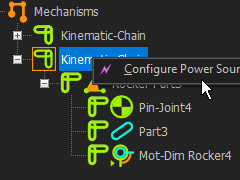
STEP 1: To open the Configure Power Source dialog:
In the Kinematics-Tree, do these three(3) clicks
a)Click the Kinematic-Chain that includes the Follower-Part
b)Right-Click the Kinematic-Chain
c)Click Configure Power Source
or
|

|
a)Click the kinematic-chain with the Follower
b)Click |
The dialog is now open.
|
|
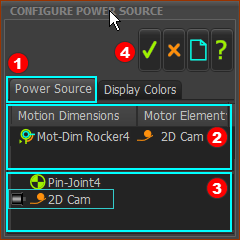
STEP 2: Select the Power-Source in the Configure Power Source
 Click the Power Source tab Click the Power Source tab
 Click Mot-Dim Rocker Click Mot-Dim Rocker
Mot-Dim Rocker is the Motion-Dimension we want to drive with a Power-Source
The default Power Source is a Pin-Joint.
 Click the 2D-Cam in the list of elements below Click the 2D-Cam in the list of elements below
The  icon (a small motor) to the left of the 2D-Cam indicates it is the Power-Source. icon (a small motor) to the left of the 2D-Cam indicates it is the Power-Source.
Also, the 2D-Cam is the Motor Element to the right of Mot-Dim Rocker.
 Click Click  to close the dialog to close the dialog
|
|
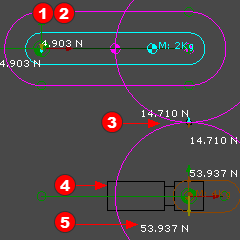 This image is only an EXAMPLE 2D-Cam. |
You should see in the example to the left:
1.The Motor symbol is not at the Pin-Joint of the Follower / Rocker
2.A Torque vector is not at the Follower Pin-Joint.
3.Action and reaction forces at the Cam Contact
4.The Motor symbol at the Cam-Shaft
5.The Action and Reaction Forces at the center of the 2D-Cam.
The center of the 2D-Cam must support the weight (m*g) of the Follower/Rocker and the Follower-Roller
The 2D-Cam does not need a torque because it does not do useful work. The 2D-Cam simply supports the mass of the Follower and Follower-Roller.
|
|