Summary
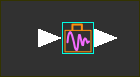
The Dynamics Briefcase FB is the 'gateway' that connects the kinematic model with the dynamic model. Input-Connectors Each degree-of-freedom has one input-connector. We recommend you experiment with a one degree-of-freedom model before you experiment with a two degrees-of-freedom model. You connect to its input-connector a wire from the output-connector of a Motion-Dimension FB*. The Motion-Dimension FB controls the motion of a degree-of-freedom in a kinematic-chain - typically. The motion-values from the output of the Motion-Dimension FB represent the motion-command to which the dynamic model responds. The label at the input-connector is - it is the symbol for a generalized coordinate. The input, , is the input to the Dynamic Analysis. The input is the motion whose dynamic response you want to analyze. * You must also connect the wires of the other Function-Blocks in the kinematic model in a particular way - see example, later. Output-Connector It has one output-connector, The data at the output-connector is equal to the kinematic motion data at its input-connector. Dynamics-Briefcase FB and parameters. Edit the Dynamics Briefcase FB to: •Add/remove input-connectors (for extra degrees-of-freedom) •Add to the Briefcase the Spring-Damper, Inertia, and Graph FBs - you must add these FBs to the graphics-area before you can then add them to the Dynamics-Briefcase FB. •Edit the integration parameters •Edit display parameters for the Graph FB. |
Add Dynamics Briefcase FB
STEP 1:Add a Dynamics Briefcase FB to the graphics-area:
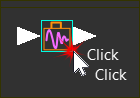
STEP 2:Open the Dynamics-Briefcase FB dialog
The Dynamics Briefcase FB dialog is now open. STEP 3:See Briefcase FB dialog |
||||||||
Dynamics : Briefcase dialog
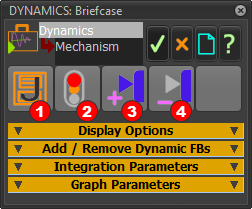
Dynamics Briefcase dialog
Toolbar:
 Save Inertia Coefficients to a CSV file - see Dynamic Inertia FB
 Rebuild the Dynamics model
When you click the Rebuild button we can reset the parameters and prepare the model to move with the dynamic response when you run the model.
You can plot the dynamic-response with a Graph FB that is 'inside' the Dynamics-Briefcase FB.
You must click again if you edit a parameter in any of the FBs associated with the Dynamics model.
 Add Input-Connector - for kinematic-chains with more than one degree-of-freedom (Motion-Dimension FBs)
 Delete Input-Connector - delete if you add too many input-connectors
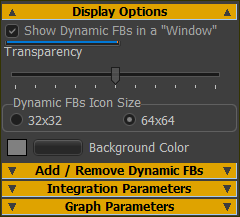 |
|
|
 |
|
|
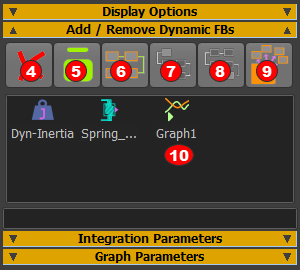
Add FBs to the Briefcase
The buttons |
||


 ,
, 
 |
|
|||||
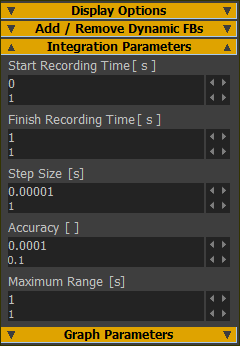
These parameters apply to the numerical integration of the differential equations. Start Recording Time
Finish Recording Time
Step Size
Accuracy
Minimum Range
|
||||||
 |
|
|||||
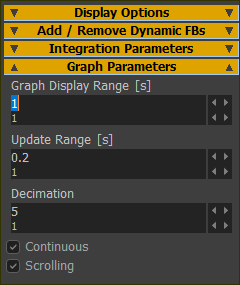
Theses parameters apply to Graph FB and how to plot the Motion-Command, Motion-Response, Force Command and Force Response over a period of time. Graph Display Range [s]
Update Range [s]
Decimation
◉ Continuous ◉ Scrolling
◉ Scrolling
|
||||||